

Action Editor
The Action Editor is where you can build an Action Workflow to perform different operations based on events that happen in your app - like when a user clicks on a Button.
Actions are executed based on the available Triggers for a particular component or Screen from the Interactions tab.
How to use
Section titled “How to use”Left panel
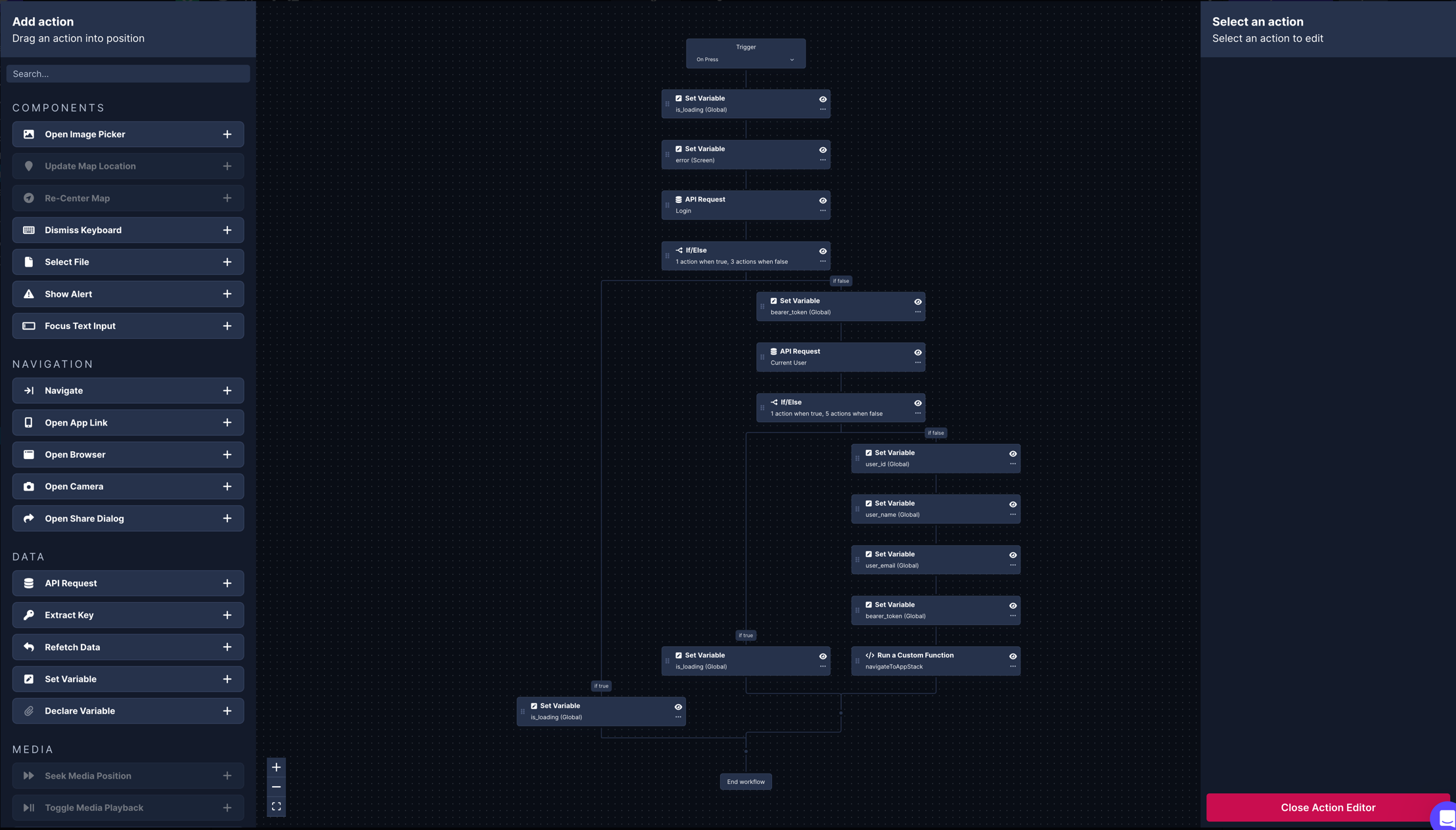
Section titled “Left panel”One the left side is the list of available Actions to choose from. Some Actions only work with a specific component and are disabled if no compatible component is available on your Screen. You can drag-and-drop these Actions into the editor wherever you see the + sign between Action nodes or click the + button on the Action in the list to add it to the bottom of your workflow.
Center panel
Section titled “Center panel”The center section is your workflow. Here you can switch between the Trigger, add/remove/duplicate Actions, and rearrange Actions according to your app’s needs.
Right panel
Section titled “Right panel”On the right side is the configuration section where you can adjust and Action’s props. This section is contextual and will update according to the Action you have selected in the workflow.