

Credits
Credits are the usage currency that powers AI-assisted development. Understanding how they work, the different types available, and how to manage them will help you use the platform effectively.
How credits work
Section titled “How credits work”Every AI interaction consumes credits based on:
- Model cost — Different AI models have different pricing tiers
- Context size — The amount of information processed (conversation history, files, code)
- Output generated — The amount of code or text the AI produces
Credits also pay for iOS and Android builds beyond your plan’s monthly allowance. Each additional successful build uses 500 credits. See Monthly native builds.
For detailed strategies on optimizing credit usage, see Using Credits Efficiently.
Using your own provider
Section titled “Using your own provider”Some plans and gateways let you run threads through your own provider access instead of Draftbit credits. Configure those options on an app’s Agents & Models tab, or for the whole organization under Organization > AI Providers. See Agent Instructions.
Supported provider paths include OpenRouter API keys, OpenAI API keys, Anthropic API keys, OpenAI subscriptions, Claude subscriptions, and Codex subscriptions.
On the Free plan, credits run Codex with OpenAI models other than GPT-6 Astra. To use Claude Code, GPT-6 Astra, or other models with credits, upgrade to a paid plan. On every plan, your own Claude or ChatGPT subscription or API key runs the agents and models it supports.
Threads that use your own key or subscription do not consume Draftbit credits for model usage, but they are still subject to that provider’s authentication, quota, rate limit, and subscription rules. If a provider rejects a request or reaches a usage limit, Draftbit shows the provider-specific message in chat so you know where to recover.
Usage details
Section titled “Usage details”Thread usage details show credit totals and token breakdowns by model and provider. Use them to understand which runs consumed credits, which runs used your own provider, and how much context or output contributed to the cost.
Credit types explained
Section titled “Credit types explained”Most credits expire one year after they’re added to your account. Credits for importing a Draftbit Classic app are the exception. The Credits page groups your credits into three cards.
Plan credits
Section titled “Plan credits”Plan credits come from your subscription, including any monthly credit package added to it. They’re added at the start of each billing period, and anything you don’t use carries over until one year after that period started.
- Monthly plans: Each month’s credits stay available for a year, so unused credits build up.
- Yearly plans: The whole year’s credits are added at the start of the term and expire at the end of it.
Standard and Pro don’t include credits on their own. You get plan credits by adding a monthly credit package, or from an earlier plan that included them.
Purchased credits
Section titled “Purchased credits”- One-time purchases: Credits you buy expire one year after purchase.
- Earned credits: Rewards from the Earn Credits page expire one year after you claim them.
Free credits
Section titled “Free credits”- Signup credits: The 3,000 credits a new account starts with expire one year after signup.
- Import credits: Credits added when you import a Draftbit Classic app expire 72 hours after the import.
Credits our team adds to your account, for example to make up for a platform issue, show their own expiry date on the Credits page.
Spending order
Section titled “Spending order”Credits that expire soonest are always spent first, so newer credits never cause older ones to go unused.
Checking your balance and usage
Section titled “Checking your balance and usage”Your balance and usage belong to your organization. Anyone in it can see them.
Credits page
Section titled “Credits page”Select Billing > Credits in the sidebar. You’ll see:
- Free Credits: signup, import, and other complimentary credits, with when the next of them expire
- Plan Credits: unused credits from your subscription, with your next renewal date
- Purchased Credits: one-time purchases, earned rewards, and credits from our team
- Total Balance: available credits across all types
- Credit Buckets: each active batch of credits, how much is left, and when it expires. Batches that expire within a day are marked Expires Soon.
- Credit Grant History: every batch your organization has received, with the amount used and remaining and a status of Active, Expired, or Depleted
- Auto top-up: buys credits for you when your balance runs low. See Auto top-up.
The Billing Overview shows the same balances as Complimentary Credits, Plan Credits, and Purchased Credits.
Usage page
Section titled “Usage page”Select Billing > Usage to see where credits went. Usage Over Time charts the credits used each day of the current period. Below it, Credit Usage History has four tabs:
- All Transactions: each charge, with the time, user, project, agent and model, thread, and credits used
- Group By App: credits per app, with the number of transactions, users, and threads
- Group By Thread: credits per thread and its app
- Group By User: credits per person, with the number of apps and threads they used
Tip: Monitor your usage patterns to identify opportunities for optimization. See Using Credits Efficiently for strategies.
When your credits run out
Section titled “When your credits run out”When your Draftbit credits are depleted, you can’t send new messages on threads that use credits. Your app and your work so far are saved. The chat panel shows your options for continuing:
- On the free plan: connect ChatGPT or Claude to keep building with your own subscription, upgrade your plan, or earn free credits. Connecting your own subscription is included on the free plan, with 20 agent runs a week.
- On a paid plan: add credits or connect ChatGPT or Claude. To avoid running out next time, turn on auto top-up.
Organization Owners and Admins connect a subscription under Organization > AI Providers. Editors can connect one for an app from that app’s agent settings. See Using your own provider.
If your app already has a ChatGPT or Claude subscription or an API key connected, the first option is Start a new thread with that connection, for example Start a new thread with ChatGPT. It opens a new thread that uses your connection instead of credits and keeps any message you’ve typed. Subscriptions are offered before API keys. Your other options stay available below it.
Buying credits
Section titled “Buying credits”On a paid plan, you can buy credits once or add a package that renews with your plan. Both take the Owner or an Admin. Credits aren’t for sale on the Free plan, so upgrade first or earn credits.
One-time purchases
Section titled “One-time purchases”Credits cost $1 per 1,000 at every package size, from 5,000 credits ($5) to 10,000,000 credits ($10,000). For example, the $1,000 package adds 1,000,000 credits. For a better rate, add a monthly credit package of $25 or more to your plan instead.
To buy credits:
- Select Buy Credits at the top of any Billing page.
- Pick a package. The total appears at the bottom.
- Select Buy Credits and pay at checkout.
You come back to the Credits page, and your balance updates shortly after. Purchased credits expire one year after purchase.
You can’t buy credits while your subscription is inactive, for example after a failed payment. See If a payment fails. If your plan is managed by Draftbit, contact Draftbit for more credits.
Auto top-up
Section titled “Auto top-up”If you’d rather not keep an eye on your balance, auto top-up buys a one-time package for you whenever your balance drops below an amount you choose. It’s charged to the card on file for your subscription, so there’s no checkout step.
To turn it on:
- Select Billing > Credits in the sidebar.
- In Auto top-up, pick a balance after When my balance drops below, from 5,000 to 100,000 credits.
- Pick the package to buy. It has to be larger than that balance, so one purchase always brings you back above it.
- Turn on the switch.
If your balance is already below the amount you picked, the first purchase happens right away. After that, we check your balance every few minutes, so pick an amount that covers a few minutes of heavy use. Auto top-up buys at most 3 times a day. Each purchase costs the same as buying that package yourself and expires one year after purchase. The organization’s Owner gets an email for each one.
Turning auto top-up on or changing it takes the Owner or an Admin, an active paid plan, and a card on file. Bank debits and other payment methods don’t work with auto top-up. If a payment fails, the Owner gets an email and we try again about an hour later. After 3 failed payments in a row, we turn auto top-up off, and the Credits page says why. We also turn it off if an automatic purchase is refunded or a payment is disputed, so it doesn’t buy those credits straight back. Update your payment method with Manage Payment & Invoices at the top of any billing page, then turn auto top-up back on.
Monthly credit packages
Section titled “Monthly credit packages”A credit package adds credits to your Standard or Pro plan every billing period. Add one on the Plan page with Add monthly credits, then pick an amount from the Credit package menu. Packages from $25 include bonus credits, and larger packages include more:
| Price per month | Credits per month |
|---|---|
| $5 | 5,000 |
| $10 | 10,000 |
| $15 | 15,000 |
| $20 | 20,000 |
| $25 | 26,250 |
| $50 | 55,000 |
| $75 | 82,500 |
| $100 | 110,000 |
| $200 | 225,000 |
| $300 | 337,500 |
| $400 | 450,000 |
| $500 | 575,000 |
| $750 | 862,500 |
| $1,000 | 1,150,000 |
On annual billing, you pay for 12 months at once and get the whole year’s credits at the start of the term. To change or remove a package, see Changing your plan.
Enterprise
Section titled “Enterprise”Enterprise plans come with custom credit allocations. Select Explore Enterprise on the Plan page to get in touch.
Earn Credits
Section titled “Earn Credits”The Earn Credits page is the fastest way to top up your balance without buying credits. Select Earn Credits in the sidebar, then complete challenges, leave feedback, or invite other builders to earn bonus credits.
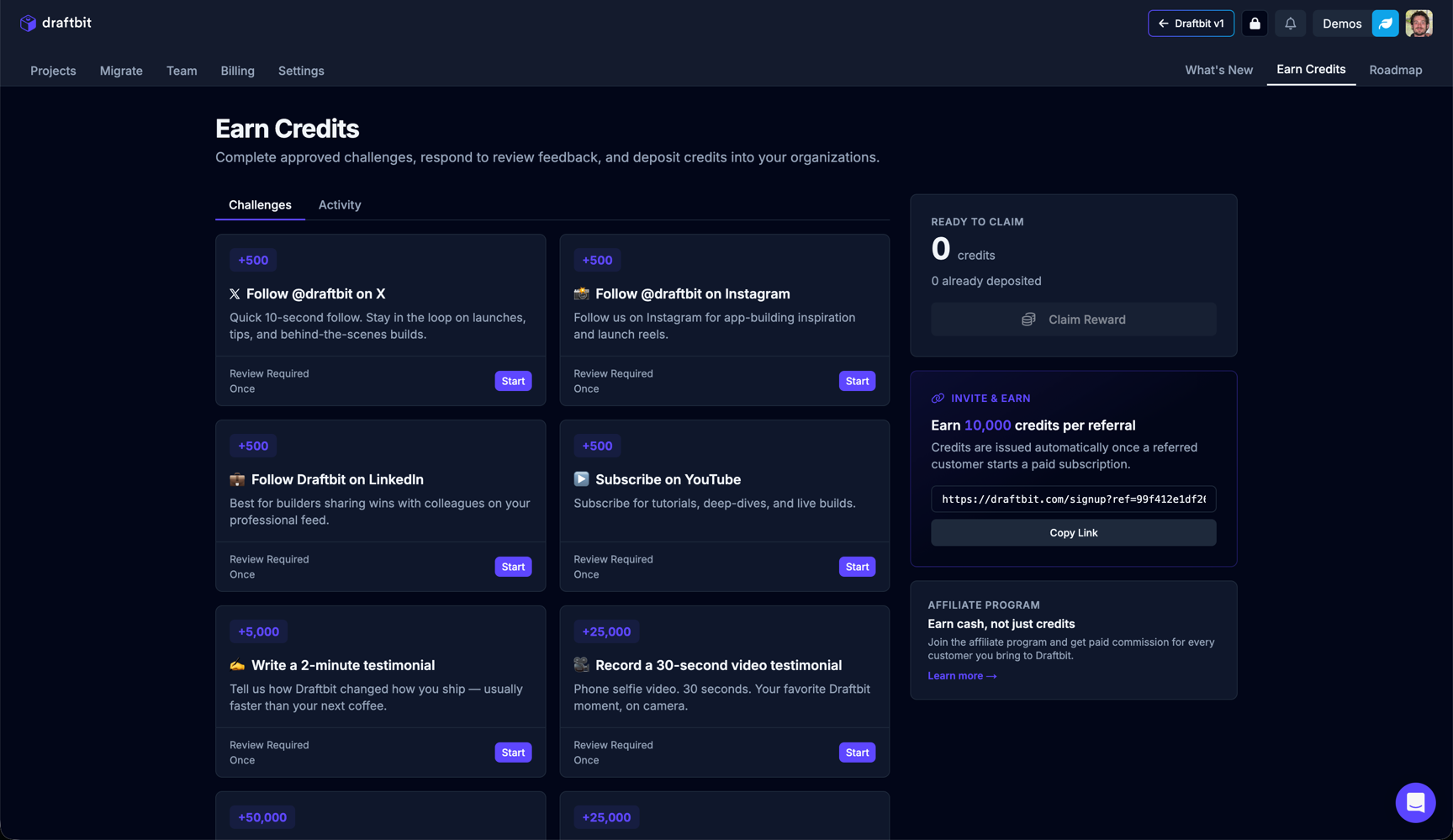
The page is split into two tabs:
- Challenges — A grid of one-time tasks you can complete to earn credits.
- Activity — A history of credits you have already earned and claimed.
When a challenge is approved, the reward shows up under Ready to Claim on the right. Rewards are yours until you claim them, and you choose which organization gets them:
- Select Claim Reward.
- Choose one of the organizations you belong to.
- Select Claim Into Organization.
Claiming is final. The credits belong to that organization from then on and show up in its credit balance.
| Challenge | Description |
|---|---|
| Social follows | Quick wins for following Draftbit on X, Instagram, and LinkedIn, or subscribing on YouTube. Each one is worth a fixed credit reward. |
| Video testimonials | Record a short video about your experience with Draftbit. Submissions are reviewed before credits are awarded. |
| Written feedback | Share detailed feedback or a case study about how you use Draftbit. Reviewed before credits are issued. |
| Invite a friend | Earn 10,000 credits per referral. Your reward is ready to claim automatically once a referred customer starts a paid subscription, with nothing to submit. The person you referred gets 10,000 credits added to their organization at the same time. Copy your unique referral link from the Earn Credits page. |
| Affiliate program | Earn cash, not just credits. Join the affiliate program to earn a commission when someone you refer pays for a Draftbit plan. |
When credits seem too high
Section titled “When credits seem too high”If you notice unexpected credit consumption or believe platform issues caused excess usage, we want to help.
What to do
Section titled “What to do”If credits feel unusually high for a task, please share the following information:
Required details:
- Thread link — Direct link to the conversation where credits were consumed
- Task description — Brief explanation of what you were trying to accomplish
- Model used — Which AI model was selected (if known)
- Preview status — Whether preview/build was failing or in error loops
- Thread length — Approximate number of messages in the thread
- Context size — Whether large files were attached or referenced
How to report:
- Use the in-app support/feedback form
- Email support with “High Credit Usage Review” in subject line
- Include your account email for follow-up
What we’ll do
Section titled “What we’ll do”When you report unexpectedly high credit usage, our team will:
Review your usage:
- Analyze the specific thread and interactions
- Check for platform-side retry loops or errors
- Identify any system issues that inflated costs
- Compare against typical usage patterns for similar tasks
Identify platform issues:
- Determine if platform bugs caused repeated attempts
- Check if preview/build failures triggered unnecessary retries
- Investigate whether system errors led to wasted credits
- Review logs for abnormal AI behavior or loops
Grant credits if confirmed:
- If platform issues are confirmed, we’ll restore the affected credits
- Credits are typically issued as bonus/grant credits
- Restoration usually happens within 1-2 business days
- You’ll receive confirmation when credits are added
Provide guidance:
- Share specific recommendations for avoiding similar issues
- Suggest workflow improvements for better efficiency
- Point to relevant documentation on credit optimization
- Offer tips for the specific scenario you encountered
Credit best practices summary
Section titled “Credit best practices summary”To make the most of your credits:
- Use the right model — Match model capability to task complexity
- Start fresh threads — Avoid long threads that accumulate context
- Be specific — Clear, scoped requests reduce back-and-forth
- Monitor usage — Check Billing > Usage regularly to spot trends
- Optimize workflows — Learn from high-usage patterns and adjust
For comprehensive strategies, see Using Credits Efficiently.